Showing posts with label Symbian s60 v3. Show all posts

X-Cleaner v1.9EN for symbian s60 v3/v5

Unlike e-clener which can only clean up drive E. x-clener able to clean junk files in drive E and drive C.
X-Clear v1.9 s60 v3 /5 the best app for clean-up ur phone.
X-Clear fiture: clean up thumbnail clean up commn sysmtem junk files clean up browser cashe files clean up temp files clean up other junk files custom setting clean up garbage clear messages from inbox outbos draft or all compress memory bluetooth records notes record u can know informations about ur phone curent profile incomin call alert current signal battery power free space of disks imei phone Cpu frequency software ver screen resolution screen pixle.
Application-based x-clener python, so install it first python for x-clener could work.
Download:
Phytonfors60
Pythonscriptshell
Pythonmodulpack


Download X-Clearv1.9EN
Read more

Manage calls with a company like VoiceCallMaster

Read more

video editor for symbian s60 v3

Read more

Xelnex Lite_Mobile Voice Recording

automatically Record all your Mobile Phone conversations

Xelnex.Lite.v1.02. S60 v3. SymbianOS9.x Unsigned.Cracked-BiNPDA.
Record all your Mobile Phone conversations automatically without the hassles of pressing a button, and no interfering " beep " noise.

Xelnex Lite - Mobile Voice Recording
Xelnex Lite is an application for recording all incoming and outgoing calls on your phone without the hassle of pressing a button. Nokia recording software currently has the limitation of a key that need to be pressed in order to activate the recording of the conversation, and also has a 60 second limitation on the length of the call.

Xelnex Lite allows you to automatically ( or manually if you choose) record all your outgoing and incoming calls and store them as either as .AMR (Smallest), .MP3 or .WAV files on your phone for easy retrieval. You also have the option of turning off the recording " beep " sound for recording notification.

Features include:
Switch between manual and automatic recording. An option of enabling a warning beep for callers to hear that the call is recorded. This however can be turned off at any time. Choose between .AMR, .MP3 or .WAV files as the recording file format. Full details of recordings can be viewed which includes; outgoing/incoming call, time and date stamp , caller/recipient's phone number and duration of call.
Switch between phone and memory card for file storage. Xelnex Lite allows you to recall discussion on your cell phone with the touch of a button. Disable option Call Recording Beeps is not allowed on N78 , N79 , N96 , 6210 Navigator.

Download Xelnex.Lite.v1.02. For Symbian S60 v3
Read more

Menu editor-change the name of the s60v3 nokia menu

Read more

rompatcherplus_2.3 for s60 v3/v5

Read more

Smart Terror v.2.2 full symbian s60 v3/v5

Read more

Mobile_PhotoShop v.1.00 RC.4 FULL for symbian s60 v3 / v5

Mobile_PhotoShop v.1.00 RC.4  FULL for symbian s60 v3 & symbian s60 v5

One of the most Awesome of HandsTool Mobile_PhotoShop v.1.00 RC.4 FULL.
Editing images purposed for created some transparent wallpaper which pick up from the root directory of phone system, even take a figure from camera phone then directing saving or save as the new one.
With the system settings feature You will be able to set Your own path as default opening of images and sett the path of saving files too.
Created custom pixel size for the new image and made in as the new Icons as You wish.
Very easy to how operate cause there is a pop up tips for every singe feature of the program.

Note : This is Java, consume much of Ram memory. If Your phone is not the model which have a large space for Ram memory, please turn off the Undo Feature & do not opening the large picture, otherwise the program will freeze.
Mobile_PhotoShop v.1.00 RC.4 FULL Feature :
- Transparency Adjustment Betwen the opacity foreground, semi transparent images & the edge transparency will be another:
1. Up, under, right and left of virtual real transparency
2. Corner, internal and brush transparency

_ Swirl Adjustment
1. Vertical & horizontal gravity
2. Up & lower shrinkage
3. Vertical & horizontal syntolic

_ Cloning image as horizontal, vertical and down mirror adjustment
_ Masking coverted Shadows effect 2 type of gradient
_ Cube, pyramid, wall around, scienic, cylinder, cone & pie. This is the type of 3 D view.
_ Text, template iconing, circle copy pixel, threshold, horizontal or vertical wave adjustment, round cut and moving the circle of the part of image pixel, also free rotation
_ Negative,corrosion, dodge deepen, brightness, sharpness, piercied, & much


Download Mobile_PhotoShop v.1.00 RC.4 FULL for symbian s60 v3 / v5
Read more

Media safe for symbian s60 v3, v5 full

Media safe for symbian s60 v3, symbian s60 v5.

Media safe for symbian s60 v3, v5

Media safe for those wants to lock some of his personal files. Works on my N78.
Media Safe - Keeps photo/audio/video/note files secure and private on your mobile phone. Protect your important media files! Media Safe software for Series 60 mobile phones allows you to store media files encrypted and password protected. You can store important Photo, Audio, Video and Note files secure on your mobile phone. Media Safe uses advanced cryptography methods to protect your media files. The program has friendly and fully customizable user interface. Strong encryption of data is provided with 256 bit BLOWFISH block cipher (one of the most secure and fastest encryption algorithm) and SHA1 secure hashing algorithm.
Main features of Media Safe:
Ability to encrypt and store media files of different types: Images, Sounds, Videos and Notes.
Strong and fast data encryption (BLOWFISH and SHA1) , which provides ultimate security.
Improved security system that encrypts file/folder names as well as the file content.
Comfortable and customizable user interface. MMC support.
Scalable user interface Ability to import multiple files with one operation Predefined short-cut keys for the most common operations Getting Started:
First time, when you start the Media Safe program, you must set the password. After that, every time you start the Media Safe, you must enter the password to access media files stored into the program. It is recommended to set the password with more than 8 characters in length. Password should not be a dictionary word. Password character sequence should be as random as possible. On the main screen 4 different stores will be listed: Images Sounds Notes Videos Use appropriate store for the specific media files. To import and encrypt media file go to the Options menu and choose Import command. To return the file to the original location use Options > Return command. Media Safe offers enhanced browsing capabilities. Images file store layout can be customized by choosing List/Grid view in menu or in settings dialog. Sounds/Videos layout is also customizable.


Download Media safe for symbian s60 v3, v5 full
Read more

SMS Anywhere Ultra for symbian s60 v3

Read more

KeyPoint Technologies Adaptxt SEE v2.50.16 S60v3

Read more

Islamic Organiser (full version) for Symbian s60v3 dan s60v5

Islamic Organiser (full version) for Symbian s60v3 dan s60v5

Islamic Organizer helps to manage Muslims practices in an interactive and advanced way, whatever cultural variations between Muslims across the world. It contains Prayer times , Qebla direction and Hijri calendar for 200 countries and 1000 cities with 5 languages (English, Arabic, French, Farsi, and Urdu) .
#Prayer times for large number of countries all over the world, covering all known calculation methods.
#Huge database with more than 200 countries and 1000 cities with the ability to add, remove and edit any location.
#Selective prayer alert for the daily five prayers.
#Different Azan voices (Mecca Azan, Medina Azan, Egyptian Azan?).
#The ability to advance the prayer alert time by 1-30 minutes.
#Iqama alert time to match the actual Iqama time at the local mosques.
#The ability to switch the mobile profile to help Muslims to concentrate during the prayers.
#Set the profile''s change time & duration for every prayer alone.
#In addition to the traditional Qibla directions, it provides an advanced method for Qibla directions using GPS.
#Online GPS that enables continuous updating of the user''s location.
#Full Hijri and Gregorian calendars with the ability to switch between them.
#Synchronization between the Organizer''s based calendar and the devices calendar.
#Displaying for the important Islamic Events. #Supports 5 languages (English, Arabic, French, Farsi, and Urdu) that depend on the mobile''s current selected language.


Islamic Organiser (full version) for Symbian s60v3 dan s60v5
Read more

Dr.Web Antivirus v6.00.0.100.40 symbian s60v5 s60v3 mobiles security (full)

Read more

Acellerator Download manager v.1.38_signed for all symbian s60 v3/v5

Read more

How to Hack Firmware & Install Unsigned Applications Nokia Symbian s60v3/s60v5

How to Hack Firmware & Install Unsigned Applications Nokia Symbian s60v3/s60v5.
The common errors that are being faced by thousands of Symbian owners worldwide are-
1. “Certificate Expired“,
2. “Unable to Install a Protected Application from an Untrusted Supplier”
3. “Restricted by Certificate Type“. Etc.
To overcome the above problems may take a few tools like:
1. Xstevedore (
download )
2. Freesigner ( download )
3. HelloOX2.Unsigned ( download )
Follow the process to get the certificate, key and how to use it.
process 1 :
Request certificate and key.
There are some very simple steps for it.
Step 1 – Download and install ( Xstevedore )
Step 2 – Open the Application and browse on to the last item on the screen! This process is absolutely magnificent, moderately easy and can have you get your certificate and key within 2-3 minutes at best.
request certificate and key for symbian v3/v5
Step 3 – It is "setting ". In this the options are :
1. Access point
2. Download path
3. Quit tips Just change access point which u want and i recommend u to change download path to memory card.

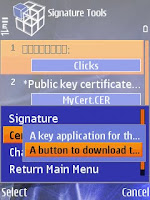
Step 4- now go to the second last option Which is "signature ". Then go to options and u will find four options : Choose second one which is " certificate tool" .
request certificate and key for symbian v3/v5
Step 5- after that again it will show two options. Choose second one which is "a button to download ".
request certificate and key for symbian v3/v5
Step 6- Then downloading will start.
request certificate and key for symbian v3/v5
Step 7- then it will ask to save. Then select memory card .
request certificate and key for symbian v3/v5
Step 8- then browse to memory card. There u will find a folder named " my cert ".
Ur certificates and key files are in the folder.
request certificate and key for symbian v3/v5
Note : The certificates generated by this method have 17 capabilities like opda's certificates and will expire after 3 years. Then again download ur certificates after 3 years which can be used for next three years. Hacking supports fully with these certificates.Ie.Full hacking.

process 2 :

1. Download and install
( Freesigner )
2. Open the application signer Free

3. Click on settings and select / navigate Certificate and key results of the request

4. Click Add to add the task. Sis file that will be the Sign-it

5. Select Sign sis and click>> go, now the application has been signed and can be installed on mobile phones.

Not all applications can be signed with the application freesigner and certificate. Certain applications can only be installed if mobile phones already in Hack. For Hack Tutorials can be found below.

process 3 :

Hack symbian s60 v3/v5
Read more

Task Manager Jbak TaskMan

Read more

Hack symbian s60 v3/v5(f1.f2)

How to Hack your Symbian S60 v3 and S60 v5 phones (HelloOX v2.03)

For all those who have had problems in hacking your s60 v3 /s60 v5 Symbian phone, Here is a nice app which will hack your phone without any hassles.

By hacking you phone you have complete access to the phone’s system files.You can install applications without signing them and get rid of those annoying java security popups.

HelloOX v2.03 is the easeist one step hacking app for your phone. None of the tedious and low success rate methods of Drakkarious.

So Here we go:-

The Tools:
- 1) HelloOX 2.03
—>  
download
- 2) SignSIS —> download

The Process:
-1 . Install SignSIS on your phone.
-2 . Open it up and select the HelloOX file.
-3 . Then go to options and then SelfSign it.
-4 . Your HelloOX is now signed for your phone.
-5 . Now install HelloOX on your phone.

-6 . Now run HelloOX.
-7 . A few screens will flash saying Mappings drives,Installing ROMPatcher, etc.

-8 . And your phone has been hacked. Before you can install any unsigned application,you will need to open ‘ROM Patcher’from the ‘Applications’ folder and activate the ‘ Installserver_FP2 ′ patch.


v2.03 update - new feature UnHack! just run HelloOX2 again after Hack, it’ll prompt a menu let you choose UnHack or Hack again. (don’t use this function after update to UnHackable firmware)
- include RomPatcher+ update to v2.2 ( by Il.Socio)
- Modo removed,because open4 all working on all phones, we don’t need it now - compatibility fix for 5700 , 6110 , 6120 , E61 , E61 i, E65

Note to all users:
Nokia has fixed the hole where current HelloOX2 using to Hack the phone on the newest N86 firmware 20.115. We almost sure all the upcoming firmware on other models will also be UnHackable like it.

However, from our experience, updating a Hacked phone firmware on PC with “Nokia Software Updater” or on phone with “FOTA” will not erase all your installed files and settings, of course the Hack will still be there too. But all of them will gone when you do a factory reset, your phone will not be Hackable in the near future until a new Hacking method found. (note: v2.03 UnHack function will remove all Hack and then become UnHackable too, don’t use it on UnHackable firmware!)

If you would like your phone keep Hackable, please do not update! If you would like to update your Hacked phone and keep it Hacked, please do not do factory reset! The safer way is wait for some more users report before update, because updating a Hacked phone will also be Hacked were just an experience, we’re not sure is it also the same on all upcoming firmware.
Read more

Edit bitrate,cut and Convert Mp3 s60v3

audio cube
AudioCube(S60 3rd edition)Version:1.3 AudioCube is a powerful audio
process tool for Nokia S60 3rd Smartphone. It has two main features,
one is quick extraction, and the other is conversion. It supports many
audio file formats, such as wav, aac, amr, mp3, wma, aiff etc. You can
use AudioCube to convert your music or ringtone to other format, and
share them with your friends who may have a phone but not support yours. Whole mp3 song conversion can work fine, but not suggestion, it is very time consuming because of the Smartphone limited process ability. Its very fun that you can use AudioCube to make your private phone ringtones.It is very simple. Just use AudioCube extract a
section of music from your favorite song, save it, and then set it as your phone ringtone. If you are not familiar with audio conversion,and have no knowledge about sample rate,bit rate, channels etc, you
can also do your audio conversion well by using default converter.The default converter provides default setting for each audio codec.

Support Devices: Compatible with all S60 3rd Edition phones.
Features:
Audio & music file explorer Play audio & music Quick extract Audio &
music from exist file Conversion between different format Support wav,
aac, mp3, amr, wma etc Support customize conversion(bitrate,samplerate, output formats and record time) Screenshots: MainScreen
Menu Audio Converting Audio Extracting Installation: Currently AudioCube does not have any trusted certificate, this may cause warning in the installation process (we will be signing the progran soon!).If you encounter problems with installing software on your S60
3rd Edition smartphone("Certificate error"), please read hack s60 f1,f2.

Download audio cube
Read more

Yxflash player s60 v3/v5 unsigned

Read more

Facebook Application for symbian s60v3 and s60v5

facebook application
Finally the dedicated Facebook application is now available for download and use for your latest Symbian 60v3 and S60v5 edition Nokia phones. From now on you can update your Facebook profile status, share and upload various images, post comments on your friends wall straight from your Nokia N97, Nokia XpressMusic 5800 Touch UI, Nokia E71, Nokia E72 and other Nokia Phones S60v3 edition devices. Admit it that the Nokia N97 powers itself quite well and is probably the better of the two when compared to the iPhone. As we all know that the Touch UI based Nokia N97 is surely set to become the next big thing in the smartphones market with a 16:9 screen resolution, The fact that N97 comes with a built in interface for Social Web 2.0 apps makes it even better, something that other similar mobile computers lack (like the 5800 XpressMusic). The official OVI store of Nokia have already uploaded the Facebook Application for Nokia and anyone using a Nokia N97 or 5800 can use it. Then again, you can always try your luck with different mobile internet browsers that are available there including the ones like Opera Mobile 10.
Let us take a look at the features that the Nokia Facebook application:
1.You can easily update your profile status with one click
2.Nokia Facebook Mobile application lets you send and receive event invitations, It also enables you to modify existing entries with the option to send PMs to the recipients explaining them the agenda.
3.You can also follow or fan any official page of a blog or website, musicians, celebrities etc.
4.Snap and Upload images and videos.
5.Create new photo albums or simply add existing photos from the Memory card to any existing albums.
6.Enjoy Facebook 'full on' even when you are on the road. All those awesome pop-ups and adding detailed information when accepting or receiving a friend request can easily be done through the S60 Facebook client for mobile.
7.Receive Push notifications of changes to your friend's profile straight on your home screen or application screen.
8.Copy paste links and share your favorite bookmarks with your Nokia N-Series phone, even iPhone users can't do it!
9.Make comments on walls and on your friend's latest status message.


Download Facebook Application for symbian s60 v3 and s60 v5

Read more